
AI agents have moved from research demos to everyday software in a surprisingly short time. They book meetings, triage support tickets, write and test code, and research topics across dozens of web pages. Yet for many people, what happens behind the scenes still feels like a black box. So, how do AI agents work? At their core, they combine a language model with goals, tools, memory, and a repeating loop of thinking and doing. This guide breaks each piece down in plain English, with no computer science degree required.
Key Takeaways
- An AI agent is software that uses a large language model to pursue a goal by planning steps, using tools, and checking results.
- Agents are built from five parts: a model, instructions, tools, memory, and guardrails.
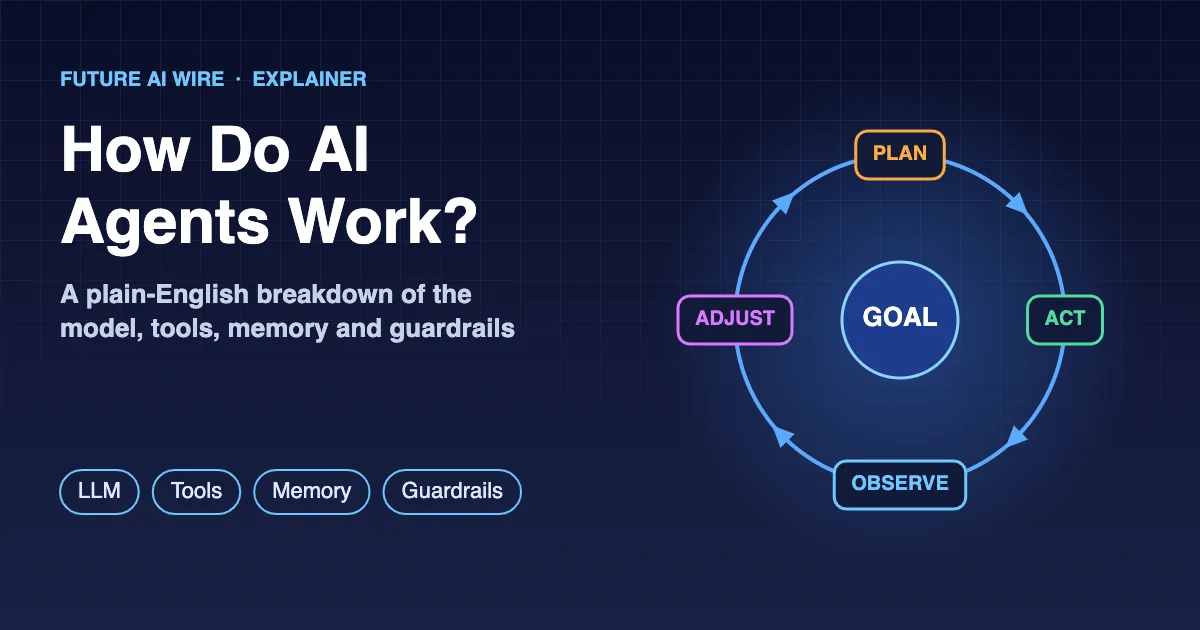
- They run in a loop: plan, act, observe, adjust, and repeat until the task is finished or a human is needed.
- Standards such as the Model Context Protocol (MCP) and the Agent2Agent (A2A) protocol help agents connect to tools and to each other.
- The main risks are compounding errors, hallucinations, prompt injection, and runaway costs, which is why human approval and permissions matter.
Table of Contents
The Short Answer
An AI agent is a system that receives a goal, figures out the steps needed to reach it, takes actions using software tools, checks the results, and keeps going until the job is done or it needs a human to step in. The “brain” is usually a large language model (LLM). The “hands” are tools such as search engines, calendars, databases, and APIs. What turns these parts into an agent is the loop that connects them: plan, act, observe, adjust, repeat.
A regular chatbot answers a question and stops. An agent keeps working toward an outcome. That single difference explains most of what makes agents useful, and most of what makes them tricky. Readers who want the broader background can start with the AI agents explained guide, or see a side-by-side comparison in AI agent vs chatbot.
What Makes Something an AI Agent?
The word “agent” gets stretched a lot in marketing, so it helps to have a simple test. A piece of software behaves like an agent when it has three qualities:
- Autonomy: it decides its own next step instead of following a fixed script written in advance.
- Action: it can do things in the outside world, such as sending an email, updating a record, or running code, not just produce text.
- Feedback: it looks at the results of its actions and changes course when something goes wrong.
Autonomy is a sliding scale, not an on/off switch. Some agents ask for approval before every important action. Others run for long stretches with minimal supervision. The wider idea of software that acts with this kind of independence is often called agentic AI.
The Five Building Blocks of an AI Agent
Almost every agent, whether it is a coding assistant or a customer service bot, is built from the same handful of parts. The names change between products, but the roles stay the same.
1. The Model: The Reasoning Engine
The language model is where the “thinking” happens. It reads the goal, the conversation so far, and the results of earlier actions, then decides what to do next. Modern models are trained to output structured instructions, such as “call the calendar tool with these details,” rather than only plain sentences. This capability is usually called function calling or tool calling, and it is what lets a model drive other software instead of just describing it. Well-known model families used in agents include OpenAI’s GPT models, Anthropic’s Claude, Google’s Gemini, and open-weight models such as Meta’s Llama.
2. Instructions and Goals
Every agent runs on a set of instructions, often called a system prompt. These describe its role, its rules, its tone, and what it is and is not allowed to do. On top of that sits the specific goal for the task, such as “find three suppliers under a set budget and summarize their terms.” Clear instructions are one of the biggest factors in how reliably an agent behaves.
3. Tools: How Agents Take Action
Tools are what separate an agent from a talkative model. A tool can be almost anything with a defined input and output: a web search, a weather lookup, a database query, a code interpreter, a payment system, or a full web browser. The agent is given a menu of available tools with short descriptions. When it decides a tool is needed, it produces a request in the right format, the surrounding software runs the tool, and the result is passed back to the model.
Connecting tools used to require custom code for each one. Open standards now make that easier. The Model Context Protocol (MCP) gives agents a common way to plug into tools and data sources, and the difference between that approach and traditional integrations is covered in MCP vs API. Anthropic introduced MCP as an open standard in late 2024, and the full specification is published on the official Model Context Protocol website.
4. Memory: Short-Term and Long-Term
Language models do not remember anything between requests on their own. Agents fake memory in two main ways. Short-term memory is the running record of the current task: the goal, the steps taken, and what each tool returned. It lives inside the model’s context window, which is the amount of text the model can consider at once. Long-term memory is information saved outside the model, such as user preferences, past conversations, or company documents, which the agent can search and pull back in when it becomes relevant. This lookup is often handled by retrieval-augmented generation (RAG), where documents are stored in a vector database and the most relevant passages are fetched for each step.
5. Guardrails and Permissions
The final building block is the one that keeps everything safe. Guardrails limit which tools an agent can use, which data it can see, how much it can spend, and which actions need a human sign-off. A well-designed agent might be free to read a calendar but need permission before cancelling a meeting, or free to draft a refund but not to send it. Keeping a person in charge of key decisions like these is known as human-in-the-loop design.
| Building block | What it does | Everyday comparison |
|---|---|---|
| Model | Reasons and decides the next step | The brain |
| Instructions and goals | Defines the role, rules, and target outcome | A job description and a to-do item |
| Tools | Takes real actions in other software | Hands and a toolbox |
| Memory | Keeps track of progress and useful context | A notebook and a filing cabinet |
| Guardrails | Limits what the agent may do without approval | A manager’s sign-off rules |
How Do AI Agents Work, Step by Step?
With the parts in place, the real magic is the loop that ties them together. Most agents follow some version of this cycle:
- Receive the goal. A person, another program, or a scheduled trigger hands the agent a task.
- Gather context. The agent reviews its instructions, any relevant memory, and the tools on offer.
- Plan the next move. The model reasons about what should happen first. Sometimes that is a full plan; often it is just the single next step.
- Act. The agent calls a tool, such as running a search or querying a database.
- Observe the result. The tool’s output is fed back to the model, which checks whether things went as expected.
- Adjust and repeat. If the goal is not met, the agent updates its plan and loops back to step three.
- Finish or hand off. Once the goal is reached, or the agent hits a limit or a decision it is not allowed to make, it reports back.
This loop might run twice for a simple request or dozens of times for a complex research task. The ability to notice a failed step and try something else is what lets agents handle messy, real-world jobs that a fixed script would choke on.
A Simple Example: Scheduling a Team Meeting
Picture an office manager asking an assistant agent to “set up a one-hour planning meeting with the design team next week.” Here is roughly what happens under the hood:
- The agent looks up who belongs to the design team using the company directory tool.
- It checks each person’s calendar for open slots next week.
- It notices that one team member is on leave for most of the week and that no slot fits everyone, so it picks the time that works for the most people and flags the conflict.
- Because its guardrails require approval before sending invites, it presents the proposed time to the manager.
- After a quick “yes,” it books a room, sends the invites, and confirms the details.
No single step is impressive on its own. The value comes from the agent chaining them together, reacting to the surprise (the person on leave), and knowing when to pause for a human.
How Agents Plan Their Work
Not every agent reasons the same way. Developers tend to mix a few common planning styles depending on the job.
Think, Act, Observe
The most common pattern alternates between a short burst of reasoning and a single action. The agent thinks about the next step, does it, looks at the result, and thinks again. This style, often linked to a research approach known as ReAct, works well when the path to the goal is unclear and new information keeps changing the plan.
Plan First, Then Execute
For tasks with a predictable shape, an agent may write out a complete plan up front and then work through it item by item. This approach is easier to review and audit, but it can struggle when something unexpected happens halfway through.
Reflection and Self-Checking
Some agents add a review step where they critique their own output before finishing. A coding agent, for instance, might run tests on the code it wrote and fix any failures. A research agent might check whether every claim in its summary is backed by a source it actually read.
When One Agent Is Not Enough
Large jobs are often split across several specialized agents. One might handle research, another writing, and a third quality control, with a coordinating agent passing work between them. This setup is known as a multi-agent system. For agents built by different companies to cooperate, they also need a shared language, which is the problem the A2A (Agent2Agent) protocol aims to solve.
Agents vs Workflows: What Is the Difference?
Not every AI-powered process needs a fully independent agent. In a workflow, a developer maps out the steps in advance and the model fills in specific parts, such as classifying an email or drafting a reply. In an agent, the model chooses the steps itself. Workflows are more predictable and cheaper to run; agents are more flexible. Many real products blend the two, using fixed steps where reliability matters and agent-style freedom where it does not. The trade-offs are explored further in agentic workflows explained.
Where AI Agents Still Struggle
Agents are powerful, but they are far from flawless. Teams adopting them tend to run into the same few challenges:
- Compounding mistakes: a small error early in a long task can snowball, because each later step builds on the one before it.
- Made-up details: language models can state wrong information confidently, and an agent may act on it.
- Getting stuck: agents sometimes repeat the same failed action or wander off-task without clear stopping rules.
- Security risks: because agents read web pages, emails, and documents, hidden instructions inside that content can try to hijack them. This attack is called prompt injection, and it is one of the main reasons guardrails matter.
- Cost and speed: every loop calls the model again, so long tasks can become slow and expensive.
Good agent design tackles these issues with tight permissions, human approval for high-stakes actions, step limits, logging, and testing on realistic tasks before launch.
Why This Matters for Businesses and Everyday Users
Understanding the mechanics makes it easier to judge where agents fit. Tasks that are repetitive, spread across several apps, and easy to check are strong candidates. Tasks that involve money, legal commitments, or sensitive data call for closer supervision. That tension is already visible in the real world: agents are starting to shop and pay on people’s behalf through agentic commerce, while some U.S. banks are blocking third-party AI agents from customer accounts over security concerns.
Key AI Agent Terms at a Glance
- Large language model (LLM): an AI model trained on large amounts of text that can understand and generate language; it serves as the agent’s reasoning engine.
- Agent loop: the repeating cycle of planning, acting, observing, and adjusting that drives an agent toward its goal.
- Tool calling: the model’s ability to request that an external tool or API be run with specific inputs.
- Context window: the amount of text a model can consider at once, which acts as the agent’s short-term memory.
- Retrieval-augmented generation (RAG): a method for fetching relevant stored information and adding it to the model’s context.
- Orchestration: the coordination of multiple steps, tools, or agents so they work together on one task.
- Human-in-the-loop: a design where people review or approve important actions before the agent carries them out.
Conclusion
In short, a language model acts as the reasoning engine, instructions set the goal and the rules, tools let it act, memory keeps it on track, and guardrails keep it safe. A repeating loop of planning, acting, and checking ties everything together. Once that picture is clear, the hype becomes easier to cut through, and it becomes much simpler to spot where an agent will genuinely save time and where a human should stay firmly in charge.
Frequently Asked Questions
Do AI agents think like humans?
No. Agents rely on language models that predict useful text based on patterns learned during training. The step-by-step “reasoning” they produce can look human, but it is a statistical process, not human understanding or awareness.
What is the difference between an AI agent and an AI assistant?
The terms overlap. An AI assistant usually responds to requests one at a time, while an agent can take multiple actions on its own to complete a larger goal. Many modern assistants now include agent features, which is why the line keeps blurring.
Can AI agents work without the internet?
Some can. An agent running on a local model with local tools, such as files and software on the same machine, does not need an internet connection. Most commercial agents, however, rely on cloud-hosted models and online services.
Are AI agents safe to use?
They can be, with the right setup. Limiting permissions, requiring human approval for important actions, keeping activity logs, and defending against prompt injection all reduce risk. No agent should have unrestricted access to money or sensitive systems.
Does building an AI agent require coding skills?
Not always. Developers often use programming frameworks to build custom agents, but a growing number of no-code builders let non-technical users create simple agents by describing the task and connecting apps through a visual interface.

The Future AI Wire Editorial Team covers artificial intelligence, AI agents, agentic AI, and emerging technologies. We publish clear, research-informed explanations and practical insights to help readers understand AI developments, real-world applications, and the technologies shaping the future.