
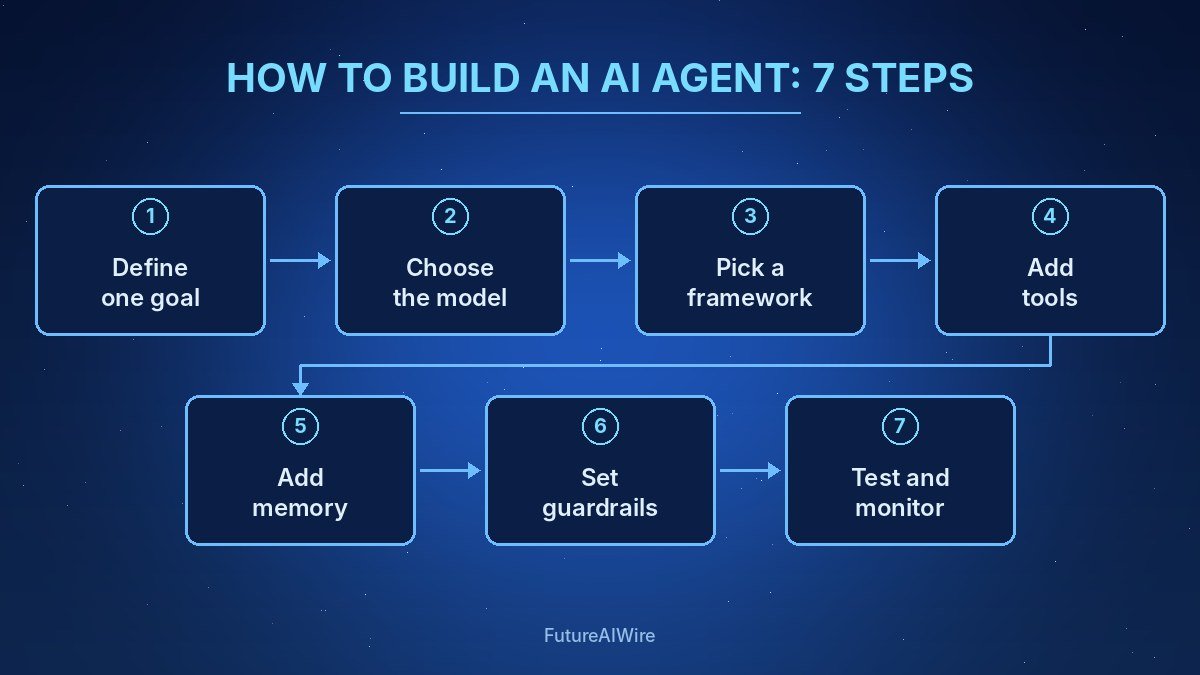
Learning how to build an AI agent comes down to seven steps: define one clear goal, choose a language model, give the agent tools, add memory, write its instructions, set guardrails, then test and monitor it. The agent itself is a loop in which a model reads the situation, decides on an action, calls a tool, checks the result and repeats until the goal is met or a person steps in.
This guide explains each step in plain language, with the main design choices and common mistakes. Readers who want the theory first can read How Do AI Agents Work?.
Table of Contents
Key Takeaways
- An AI agent is a model plus tools, memory and instructions running in a reasoning-and-action loop.
- Narrow, well-defined goals produce far more reliable agents than open-ended ones.
- Frameworks such as LangGraph, CrewAI, the OpenAI Agents SDK and Google’s Agent Development Kit handle much of the plumbing.
- Standards like the Model Context Protocol (MCP) make it easier to connect agents to tools and data.
- Evaluation, permissions and human approval steps matter as much as the model choice.
What Does It Take to Build an Agent?
An agent needs four parts: a model that reasons, tools that let it act, memory that keeps context, and an orchestration loop that ties them together. The loop is often described as ReAct, short for reasoning and acting, in which the model alternates between thinking about the next step and calling a tool.
| Component | Role | Common options |
|---|---|---|
| Model | Understands the task and decides the next action | GPT, Claude, Gemini, Llama and other LLMs |
| Tools | Let the agent search, read, write or call APIs | Function calling, MCP servers, browser automation |
| Memory | Keeps track of the conversation, progress and facts | Context window, vector database, key-value store |
| Orchestration | Runs the loop, handles errors and approvals | LangGraph, CrewAI, OpenAI Agents SDK, Google ADK, AutoGen |
How to Build an AI Agent in Seven Steps
Step 1: Define One Narrow Goal
The first step is to write down exactly what the agent should achieve and how success will be measured. “Answer refund questions and issue refunds under a set amount” is a workable goal; “handle customer service” is not. A narrow goal limits the tools needed and makes testing realistic.
Step 2: Choose the Model
The model should be strong at instruction following and tool use. Larger frontier models handle complex planning better, while smaller or open models can be cheaper and faster for simple, high-volume tasks. Many teams start with a capable hosted model, then test whether a cheaper one meets the same quality bar.
Step 3: Pick a Framework or Go Code-First
A framework saves time on loops, retries, state and tracing. Graph-based tools such as LangGraph suit workflows that need precise control, while role-based tools such as CrewAI suit teams of cooperating agents; the trade-offs are covered in AI Agent Frameworks Compared. Developers who want to build AI agent prototypes with minimal dependencies can also call a model API directly and write a short loop themselves.
Step 4: Give the Agent Tools
Tools are functions the model can call, each with a name, a description and an input schema. Good descriptions matter because the model chooses tools by reading them. The Model Context Protocol lets an agent connect to ready-made servers for files, databases, calendars and other systems, and the differences from plain integrations are explained in MCP vs API.
Each tool should follow least privilege: read-only where possible, limited write access where necessary, and no access to anything the goal does not require.
Step 5: Add Memory
Short-term memory is the conversation and task history held in the model’s context window. Long-term memory stores facts, past outcomes or documents outside the model, often in a vector database that supports retrieval-augmented generation (RAG). Keeping memory focused prevents the agent from being distracted by stale or irrelevant information.
Step 6: Write Instructions and Guardrails
The system prompt explains the agent’s role, the goal, the tools, the rules and when to stop or ask a human. Guardrails enforce those rules in code: spending limits, allow-lists of domains, input and output filters, and approval steps before irreversible actions such as payments, deletions or sending emails.
Step 7: Test, Evaluate and Monitor
Testing should use a set of realistic tasks with known correct outcomes, including tricky edge cases and malicious inputs. Teams measure task success rate, number of steps, cost per run and how often a human had to intervene. After launch, tracing tools record every step so failures can be diagnosed and fixed.
No-Code and Low-Code Options
Knowing how to build an AI agent does not always mean writing custom code. Platforms such as Microsoft Copilot Studio, Salesforce Agentforce, n8n and Zapier let non-developers assemble agents from visual blocks, connectors and prompts. These options are faster to start with but offer less control over complex logic, so they fit internal automations better than mission-critical systems.
Security Checks Before Going Live
Agents that read external content can be manipulated by hidden instructions, a risk known as prompt injection. Before launch, teams should limit permissions, separate trusted from untrusted inputs, log every action and require approval for sensitive steps. Real attack patterns are collected in Prompt Injection Examples, and the OWASP Top 10 for LLM Applications is a useful external checklist.
Common Mistakes to Avoid
- Giving the agent too many tools, which makes tool selection less accurate.
- Skipping evaluation and judging the agent from a few happy-path demos.
- Letting the agent take irreversible actions without a human checkpoint.
- Writing vague tool descriptions that leave the model guessing.
- Ignoring cost: long loops with large models can become expensive at scale.
Key Terms Glossary
- ReAct: A pattern in which a model alternates between reasoning about a task and taking actions with tools.
- Function calling: A model feature that outputs structured requests to run predefined functions.
- MCP: Model Context Protocol, an open standard for connecting AI applications to tools and data sources.
- RAG: Retrieval-augmented generation, which feeds relevant documents to a model at answer time.
- Guardrails: Code-level limits and checks that keep an agent within allowed behaviour.
- Evaluation set: A collection of test tasks with expected outcomes used to measure agent quality.
- Tracing: Recording every model call and tool call in a run for debugging and auditing.
Frequently Asked Questions
Can someone build an AI agent without coding?
Yes. No-code platforms let users connect a model to apps and define steps visually, although custom code gives more control for complex or high-risk workflows.
Which programming language is best for AI agents?
Python is the most common because most agent frameworks and AI libraries support it first. JavaScript and TypeScript are a close second, especially for web-based agents.
How long does it take to build a basic agent?
A simple prototype with one or two tools can be built in a day. A reliable production agent usually takes weeks, mostly spent on testing, guardrails and integration.
How much does it cost to run an AI agent?
Cost depends on the model, the number of steps per task and the volume of tasks. Teams track cost per run during testing and often route simple tasks to cheaper models.
What is the difference between an AI agent and a workflow automation?
A workflow automation follows fixed steps, while an agent decides which steps to take based on the situation. Many systems combine both, as described in Agentic Workflows Explained.
Do AI agents need a vector database?
Not always. A vector database helps when the agent must search large document collections, but many agents work well with only the context window and direct tool calls.
Related Reading on Future AI Wire
- AI Agent Frameworks Compared: How to Choose in 2026
- AI Agent Security: Risks and How to Manage Them
- Types of AI Agents Explained (With Examples)
Sources and further reading: Model Context Protocol; ReAct paper (Yao et al.); OWASP Top 10 for LLM Applications; LangGraph documentation; CrewAI documentation.

The Future AI Wire Editorial Team covers artificial intelligence, AI agents, agentic AI, and emerging technologies. We publish clear, research-informed explanations and practical insights to help readers understand AI developments, real-world applications, and the technologies shaping the future.